Over the past few years, we’ve been on a journey to modernise how we run Amazon Elastic Compute Cloud (EC2) instances at Slack.
In our first post, Advancing Our Chef Infrastructure, we shared how we moved from a single Chef stack to a resilient, multi-stack setup with versioned cookbook deployments and safer promotion workflows. This afforded us far more reliability and operational control across tens of thousands of EC2 instances.
Subsequently, in Advancing Our Chef Infrastructure: Safety Without Disruption, we tackled deployment risk without the need for teams to rewrite their cookbooks. By introducing split production environments, signal-based Chef runs, and smarter rollout mechanisms, we dramatically reduced the impact radius of failures while keeping our legacy platform stable. These changes allowed us to safely operate our EC2 ecosystem at scale while we plan the future at a relaxed pace.
But as we kept improving, a bigger truth became clear.
Even with safer rollouts, better orchestration, and stronger guardrails, the old model—continuously updating long-lived EC2 instances—was hitting its limits. Service-level deployments were tricky, infrastructure drift was inevitable, and coordinating changes across multiple layers added complexity. Containers solved this for some classes of workloads, but not everything could migrate easily.
We needed a new approach—one that brought modern deployment practices like immutability, progressive rollouts, and automated safety directly to EC2 instances.
Enter Shipyard.
Shipyard is Slack’s next-generation EC2 platform. It treats infrastructure as deployable artifacts rather than endlessly mutable instances. It gives teams service-level deployment primitives, tight integration with our build and orchestration systems, and the confidence to update infrastructure with the same safety and predictability we expect from modern app delivery platforms.
In this post—the third chapter of our journey—we’ll explain why we built Shipyard, the principles behind its design, and how it represents a fundamental shift in how we think about running EC2 instances at Slack.
What Shipyard Provides
Shipyard is designed to bring modern infrastructure principles to EC2 instances while preserving the flexibility teams expect from EC2. Rather than focusing on configuration management as the center of the system, Shipyard shifts responsibility toward build pipelines, deployable artifacts, and automated safety mechanisms.
Some of the key capabilities of the platform include:
Multi-Architecture and Multi-OS Support
The platform is designed from the start to support multiple CPU architectures, including both AMD64 and ARM-based Graviton instances, with support for multiple operating systems such as Ubuntu, RHEL, and Amazon Linux. This flexibility allows teams to optimize for cost, performance, or compatibility without needing separate platform implementations.
Shipyard is particularly valuable for workloads that cannot migrate to containers, such as infrastructure components, Kubernetes worker nodes, and our egress network stacks.
Metrics-Driven Deployments with Safety Controls
Each service integrates with our deployment orchestration system called Gondola to enable progressive rollouts with metric based automated safety checks. Deployments can automatically halt based on service health signals, or automated rollback to previous known good versions.
Fast and Predictable Provisioning
Shipyard uses a layered image approach, inspired by how containers work. A shared “golden” base image provides common infrastructure components, and service-specific images are built on top of that foundation. This minimizes work at launch time, so instances can come online quickly and predictably across regions.
Simplified Configuration Management
One of the biggest architectural shifts is how we use configuration management.
Previously, instances would run scheduled Chef jobs that periodically checked and reapplied configuration, so any manual or unexpected changes would be reverted back to the desired state.
In the new model, configuration is applied during well-defined lifecycle phases like image baking and initial provisioning, rather than being continuously enforced in the background. Configuration tools are mainly used to deploy services, not to constantly modify the entire system. This reduces background load, avoids unintended overwrites, and makes system behavior much easier to reason about, since instances aren’t continuously changing over time.
Real-Time Inventory and Fleet Visibility
Shipyard comes with a new inventory system called Peekaboo, giving us near real-time visibility into the state of our EC2 fleet. Instead of relying on Chef Server as the source of truth, Peekaboo taps directly into cloud events and instance metadata, providing better telemetry across environments. It can even track instances from non-Shipyard deployments, giving us a complete view of the entire fleet in one place.
We built Peekaboo using AWS EventBridge, OpenSearch, and Lambda. It has everything teams need: a UI to explore the fleet, an API for integrations, and a command-line interface (CLI) for quick command-line checks. By centralising this information, it removes the guesswork and gives us a single place to view and manage EC2 instances.
Short-Lived, Continuously Refreshed Instances
To keep our EC2 instances secure and truly immutable, each instance has a limited lifespan and is automatically rotated on a regular schedule. This means our fleets are always fresh; potential vulnerabilities have less time to cause issues, and teams focus on replacing instances rather than making in-place changes.
Golden Base Images: Introducing slack-zero
At the foundation of the Shipyard is a shared base image called “slack-zero.” This is the core machine image built by Slack’s Compute Platform Team and maintained collaboratively with our security and monitoring teams.
The slack-zero image contains:
- Operating system baseline and hardening
- Networking and service discovery configuration
- Monitoring and security agents
- Common tooling and foundational system configuration
You can think of slack-zero similarly to how teams use a base Docker image or how we start from a vendor-supplied Ubuntu image and layer additional components on top. It provides a standardised, trusted foundation that every service inherits, while still allowing teams to customize their own runtime environment on top of it.
Base images are treated as immutable but ephemeral. When foundational components need to change—such as a security patch, monitoring update, or networking improvement—a new slack-zero image is produced. Downstream service images can then rebuild on top of the updated base to inherit the latest fixes and improvements.
To build slack-zero, we use AWS Image Builder rather than Packer. Image Builder provides several built-in advantages over our previous approach with Packer, including:
- Lifecycle Management: Old AMIs are automatically cleaned up using lifecycle policies, helping reduce storage costs.
- AWS System Manager (SSM) Parameter Publishing: Each new slack-zero image updates an SSM parameter that indicates the latest available AMI for an account. Service pipelines read this parameter to ensure they always build on the most up-to-date base.
- Event-Driven Automation: When a slack-zero image finishes baking successfully, EventBridge and Lambda automatically trigger downstream pipelines in service owner accounts so dependent images can be rebuilt.
- Built-in Testing: Before an AMI is published, Image Builder launches temporary instances and runs validation tests. This ensures every image is verified before distribution, reducing risk and increasing confidence in production rollouts.
Together, these capabilities allow us to continuously evolve the platform foundation while keeping adoption friction low for service teams.
Service Images
Each service team builds its own AMIs using slack-zero as the foundation. This allows teams to control their runtime environment while inheriting standardized platform components maintained by the platform organization.
Service image pipelines define:
- What software is installed
- How the service is configured
- What happens during instance initialisation for this service
Because most configuration is baked directly into the image, instances launch quickly and consistently, minimizing configuration drift and ensuring predictable behavior across the fleet.
By combining the immutable slack-zero base with service-specific layers, Shipyard provides both platform stability and team-level flexibility, enabling services to innovate safely without sacrificing operational consistency.
Baking and Provisioning
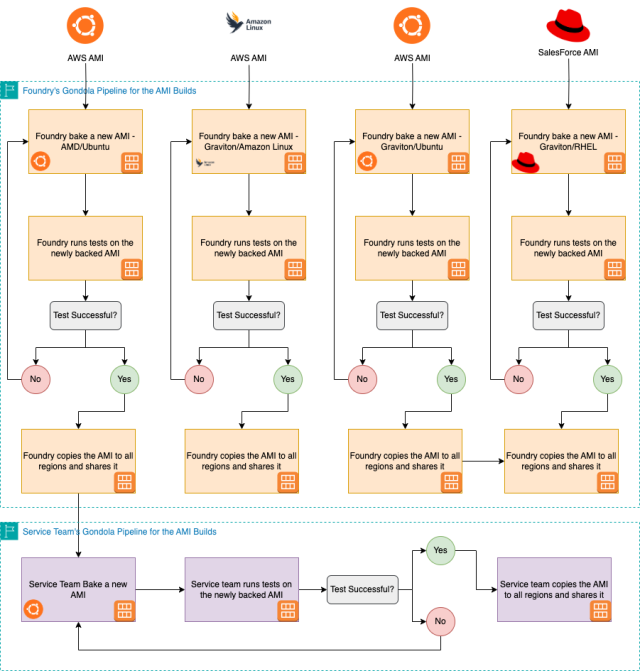
Shipyard separates instance preparation into two distinct phases: baking and provisioning.
During the bake phase, we install packages and include configuration that is consistent across environments. This ensures every instance starts from a fully prepared, known-good state with the majority of work already completed before launch.
Environment-specific settings—such as secrets, regional configuration, or deployment metadata—are applied during the provisioning phase when the instance boots. This step is intentionally lightweight and typically involves only dropping configuration, retrieving secrets, and starting services.
By moving heavy operations like package installation into the bake phase, instances can become operational in seconds rather than minutes. This fast startup time is critical for scaling events, rolling deployments, and automated instance replacement.
This provisioning model provides a strong balance of consistency, speed, and flexibility: images deliver a stable baseline, while minimal provisioning adapts instances to their runtime environment without introducing drift.
Deployments and Fleet Updates
When teams need to roll out changes, they build a new Amazon Machine Instance (AMI) and then run their deployment pipeline to roll it out. Instead of patching existing instances, fleets are updated through controlled replacements, keeping everything consistent and predictable.
For Auto Scaling Groups (ASGs), we use AWS Instance Refresh, and Kubernetes worker fleets use Karpenter for lifecycle-driven updates. Services with special deployment needs can use alternative rollout executors. Our global deployment orchestrator, Gondola, supports these patterns, giving teams flexibility while keeping a consistent deployment experience.
Emergency Fixes and Rapid Deployment Pathways
For urgent situations, the platform allows targeted configuration changes on running instances, but these are meant for emergencies only. Affected instances are expected to be replaced afterward via regular deployment pipelines.
Our emergency workflows use AWS Systems Manager with a predefined document to run selected Chef recipes, letting teams quickly apply critical fixes. Once stable, instances are cycled to return to the intended immutable state.
What Do Customer Pipelines Look Like?
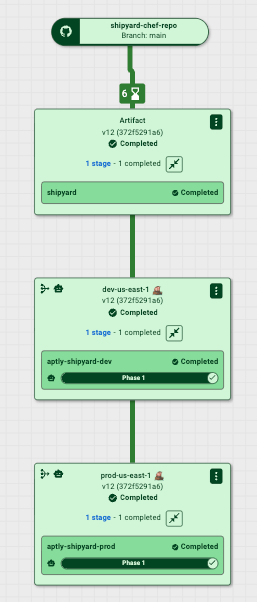
Customer pipelines in Shipyard can have multiple stages, giving teams flexibility to design them around their service and operational needs. Each stage in Gondola represents a deployable unit, such as an ASG, a Kubernetes cluster, or a group of EC2 instances.
For example, the Egress Team runs separate canary and production ASGs in each availability zone, with deployment stages ordered so updates flow sequentially. Gondola updates each stage, monitors key metrics, and rolls back automatically if problems are detected, preventing issues from spreading.
This staged approach, combined with Shipyard’s fast provisioning and immutable AMIs, lets teams safely deploy complex updates at scale while maintaining observability and control.
What Happens in the Gondola Stage?
When Gondola builds an artifact, it produces a deployable package for a service with two main parts:
- The AMI to roll out across the fleet
- The Chef artifact containing versioned recipes associated with a Git commit
Gondola treats these together as a single deployable unit. Each stage uses a service-defined executor to perform the rollout:
- ASG-based deployments: The executor updates the launch template with the new AMI and configuration. Chef code is packaged to Amazon Simple Storage Service (S3), and new instances use a baked-in bootstrapper to fetch the correct artifact and run the relevant recipes. Configuration metadata ensures only the right configuration is applied.
- Kubernetes worker fleets: The executor tells Karpenter which AMI to use and provides the same configuration metadata. Nodes bootstrap in the same way, ensuring consistent provisioning.
For services with special deployment needs, Gondola makes it easy to add new executors. This lets Shipyard support different deployment models while keeping artifact handling and provisioning consistent and predictable.
By combining AMI updates, versioned configuration artifacts, and metadata-driven bootstrapping, Gondola ensures every instance gets the correct software and configuration for its role, no matter how it’s deployed.
Simple Pipeline
Shared Responsibility
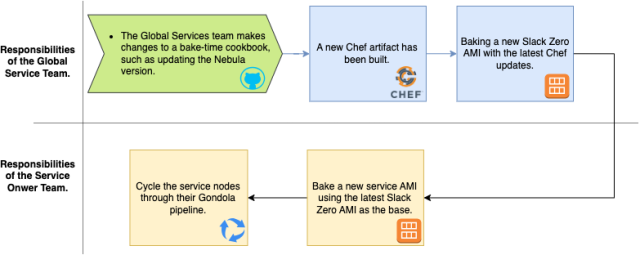
Shipyard’s layered image model is built on a clear shared responsibility between platform teams and service teams. The Compute, Security, and Monitoring teams manage the base layer, making sure it includes all global infrastructure components, security patches, and essential configurations. Service teams then build their own AMIs on top of this base, adding the software and settings specific to their service.
Whenever the Compute team rolls out a fix or update—whether it’s a security patch, a monitoring agent update, or a networking change—service teams are responsible for incorporating the updated base into their own AMIs. This way, every service image automatically benefits from the latest improvements and security fixes from the shared base.
This approach lets each team focus on what they do best while keeping the fleet consistent, secure, and reliable. The diagram below illustrates how the base and service layers work together and highlights where each team’s responsibilities lie.
A Caveat on Immutability
While Shipyard instances are mostly immutable, there is an important exception: secrets. Each instance runs the Consul Template service, which allows us to roll out updated secrets from Vault without cycling the fleet. This means that, although packages and configurations are fixed at bake time, sensitive data like credentials or certificates can still be updated dynamically. Our infrastructure is semi-immutable: the core system and service layers remain consistent, but critical runtime secrets can be refreshed safely as needed. This approach balances stability, predictability, and security across the fleet.
The Reaper
The Reaper evaluates two primary inputs. First, it consumes signals from external systems—such as security tooling or AWS EC2 events—that indicate an instance may no longer be in its desired state and should be considered “tainted.” Second, The Reaper performs periodic checks to identify instances that have been running for longer than their allowed lifespan. When either condition is met, the instance is scheduled for replacement according to its service policies.
This approach helps reduce configuration drift, limit exposure to vulnerabilities, and reinforce the principle that infrastructure should be updated by redeploying rather than modifying systems in place. The result is a platform that is more reliable, auditable, and predictable.
For example, while manual remote access remains available for emergency scenarios, manually accessing a production-class node will generate a signal that marks the instance for eventual replacement, supporting our immutable infrastructure goals.
The Reaper also integrates with Peekaboo to track instance age across the fleet. Once a node reaches its maximum lifespan, it follows the same graceful replacement workflow.
Looking ahead, we plan to make the system more context-aware so that only meaningful changes—such as software updates or configuration drift—trigger replacement, while read-only or low-risk actions do not create unnecessary churn.
Taming the Reaper
The Reaper is designed not only to enforce lifecycle policies, but also to give teams control over how replacements occur. Built-in rate limiting allows service owners to define how many instances can be replaced at a time, scoped by service, region, or availability zone, preventing sudden capacity impacts.
For emergency situations, we provide a global pause mechanism—the “big red button.” By placing a control object in S3, teams can temporarily halt all Reaper activity across the fleet. This provides a safe and immediate way to stop instance cycling during incidents or periods of elevated risk.
We also provide a CLI that allows service owners to manage rate limits, inspect configuration, and activate or release the global pause when needed.
In addition, controlled access mechanisms such as short-lived SSH certificate workflows can be used for break-glass scenarios where deeper investigation is required, while still maintaining overall lifecycle safety commitments.
Together, these capabilities make the Reaper both predictable and controllable—enforcing instance immutability by default while giving teams the visibility and safeguards they need to operate confidently.
How Do We Test Changes?
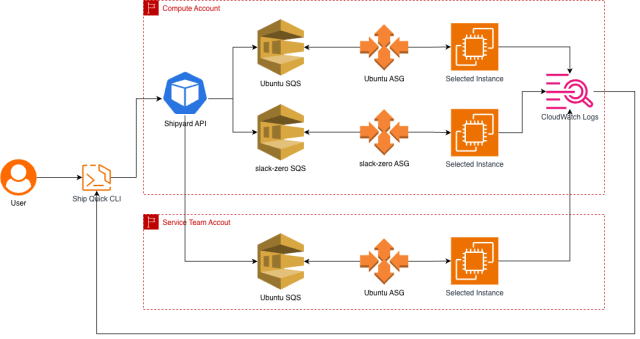
Both platform teams and service owners need a safe way to test cookbook changes before merging a pull request, so we built a system called Ship Quick—a developer workflow that runs a realistic bake-and-provision test on real infrastructure.
Developers run a CLI command from their cookbook repo, where a YAML file defines the test cases. Ship Quick packages the cookbook, uploads it to S3, and sends a workflow message to a queue. A fleet of worker instances—managed by a lightweight process called Longshoremen—picks up the job, detaches from its Auto Scaling Group, runs the Chef workflow, streams logs back to the CLI, and then terminates (unless the developer chooses to keep it for debugging).
We run Longshorem in two separate worker fleets because of how our bootstrapping works. The vanilla Ubuntu fleet is used to bake and test the base slack-zero image—it can’t build on top of itself, so starting from a clean Ubuntu AMI is required. The slack-zero fleet is for service team cookbooks, which depend on the pre-baked slack-zero AMI. Running tests from this fleet ensures provisioning is validated against the same foundation used in production.
Splitting the fleets this way helps ensure each layer is tested against the correct base. Both fleets scale automatically with demand, and slack-zero workers are continuously updated to the latest images so tests always reflect the current production environment.
Teams that build images in their own AWS accounts can also provision dedicated worker fleets and route Ship Quick jobs to them, ensuring isolation while keeping the same workflow.
What’s Next?
So far, Shipyard has been working really well for short-lived services, and we’re actively onboarding teams from the legacy EC2 platform. Our next challenge is long-lived instances—things like Slack’s data nodes, singleton services like GitHub Enterprise, or third-party business technology instances such as Atlassian JIRA. These can’t be cycled quickly, so we need ways to patch and update them safely while ensuring the Reaper handles them correctly.
We’re collaborating closely with service teams to develop new deploy executors in Gondola for these longer-lived workloads. As more teams adopt Shipyard, we’ll keep iterating on tooling, developer workflows, and the overall deployment experience to meet the platform’s diverse needs.
Future posts in this series will cover the challenges we encounter as Shipyard evolves and take a closer look at its components—including the Shipyard API, image pipelines, developer workflows, and our inventory system. Stay tuned!